Physical Address
304 North Cardinal St.
Dorchester Center, MA 02124
Physical Address
304 North Cardinal St.
Dorchester Center, MA 02124

To add a photo in an Instagram comment, open a post or Reel, tap the comment box, tap the photo icon next to it, choose an image from your phone, and tap the Post icon. If you do not see the photo icon, the feature may not be available on your account yet.
Instagram began rolling out photo comments in 2026, so the feature is not available to everyone at the same time. That is why one person may be able to share a meme under a Reel while you only see the GIF option.
This guide covers the exact steps, why the photo icon may be missing, and what to do if you cannot use the feature yet.
No photo icon? Update the app, restart it, try another post or Reel, and wait. Instagram is releasing the feature in stages.
Yes, but only if the feature has reached your account. Instagram is rolling out photo comments in stages, so some people have them and others don’t yet. One of Instagram’s own post about the rollout shows the feature, which lets people reply with an image from their camera roll instead of only text, emoji, or GIFs.
Reports from June and July 2026 described the initial rollout of photo comments. Articles from late summer still describe availability as uneven. As of October 2026, NapoleonCat’s Instagram update tracker lists photo comments under both posts and Reels.
One important thing to know: current reports describe photo comments as a mobile app feature. I couldn’t find confirmation that it works on Instagram.com in a desktop browser, so don’t count on it there.
Tap the comment icon on the post, tap the photo icon next to the comment box, choose an image, and post it. Here is the same thing in more detail.
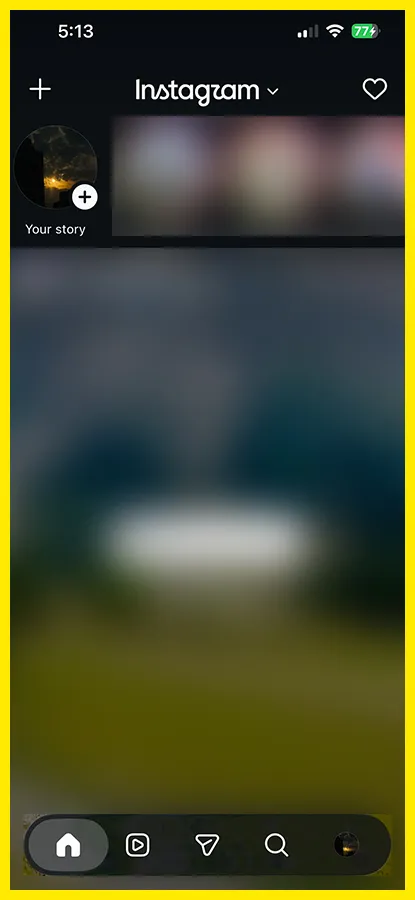
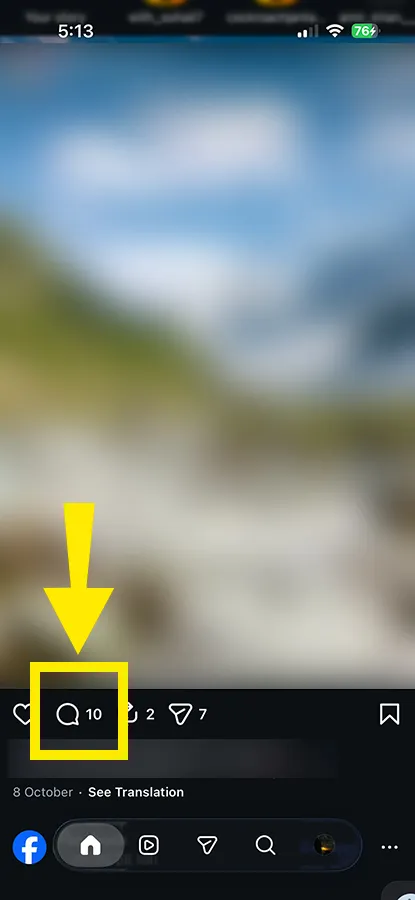
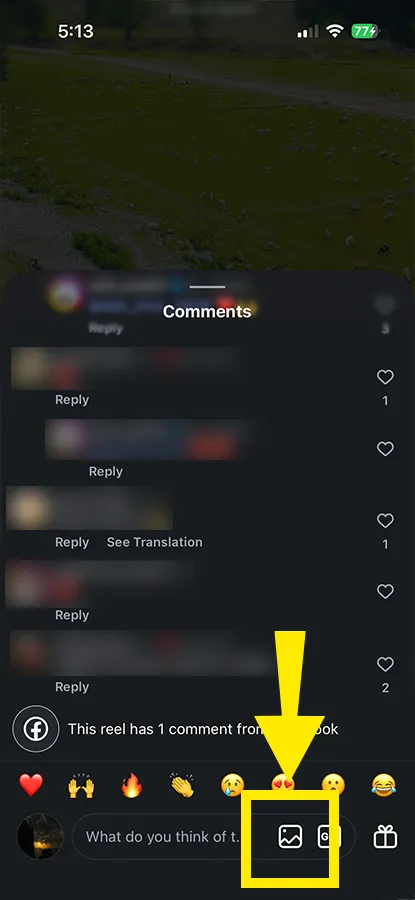
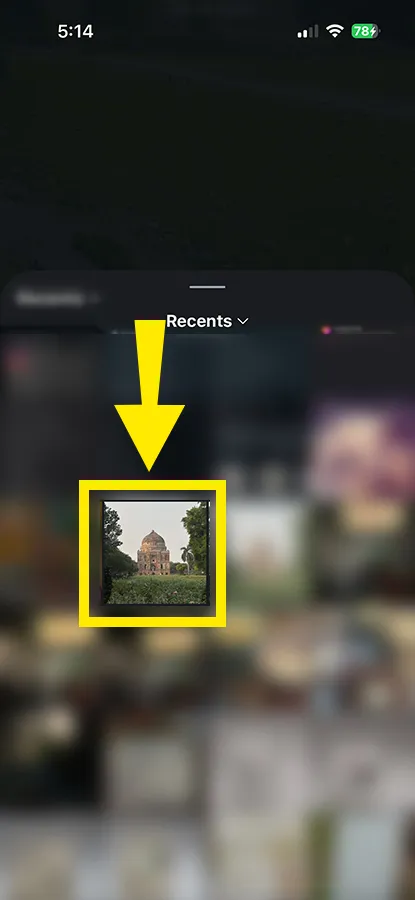
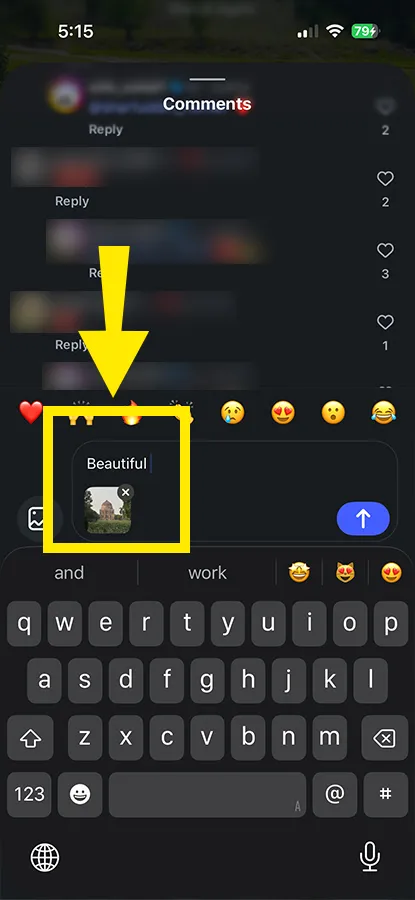
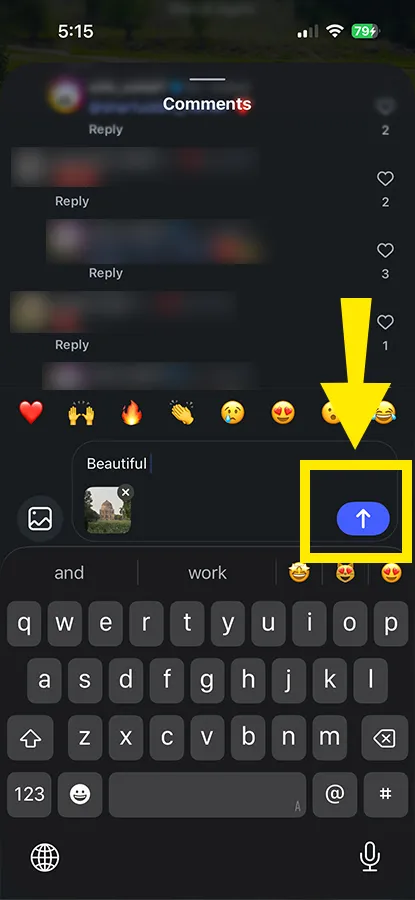
Why permission is needed: Instagram cannot show your gallery unless your phone allows it. While uploading a photo, Instagram may ask you to allow access to your photos if you have not allowed it before.
On Android, check the app’s Photos and videos permission in your phone settings. On iPhone, go to Settings, tap Instagram, and then tap Photos.
You can add a photo either as a new comment or as a reply to someone else’s comment. The process is almost the same, but the photo icon may appear in a slightly different place.
To reply to someone, tap Reply under their comment. Then tap the photo icon beside the reply field, choose an image from your gallery, add text if you want, and tap the Send arrow. Your photo will appear under that person’s comment.
When you reply, Instagram may automatically add the person’s username with an @ symbol. Keep that username, because it shows that your photo is a reply to that person.
For a normal comment, tap the main comment field at the bottom of the post instead of tapping Reply. Your photo will appear as a separate comment, not under someone else’s comment.
For example, if a creator asks, “Where is this couch from?”, you can reply with a photo of the same couch in your living room. It answers the question faster than a long text comment and helps other people reading the thread.
Yes. Photo comments are reported to work under both regular posts and Reels. The steps are the same. Open the Reel, tap the comment icon, then use the photo icon.
One small trick. On a Reel, the video keeps playing behind the comment panel. If you want a calmer view while you pick an image, pause the Reel first.
Most of the time, the photo option is missing for one of three reasons:
While writing this article, I tested the feature myself. At first, the photo option was not available in my Instagram account. I opened a random post, tapped around in the comment section, then closed and reopened the app. When I returned to the same post, the option to add an image from my gallery appeared.
However, when I checked other posts, the photo option was visible on some posts but not others. This suggests that availability may depend on Instagram’s account-level rollout and the post owner’s comment settings.
| What you see | Likely reason | What to try |
|---|---|---|
| No photo icon on any post | Staged rollout, so your account may not have it yet | Update the app, restart it, and check again in a few days |
| Icon shows on some posts, not others | The post owner’s comment settings | Try a different public post or Reel |
| Icon shows but gallery is empty | Photo permission is off on your phone | Allow Instagram to access photos in your phone settings |
| Comment won’t post | Weak connection or an app glitch | Switch between Wi-Fi and mobile data, then force close and reopen Instagram |
Instagram usually releases new tools to small groups first. The same pattern explains why Instagram story stickers go missing for some people and not others. A missing feature does not always mean there is a problem with your account.
A warning while you wait: don’t install any app or “mod” that promises to unlock photo comments. This kind of feature switches on from Instagram’s servers, so a download can’t safely force it. You’re more likely to hand over your login.
If everything else checks out and the icon still never shows up, you can report it from inside Instagram. Open your profile menu, go to Settings and activity, then Help, then Report a problem. The Instagram Help Center has more options.
Possibly. MacMagazine’s walkthrough (written in Portuguese) describes a switch called Allow photo comments. On iPhone and iPad, open your profile, tap the menu, go to the “How others can interact with you” section, tap Comments, and flip the toggle. The article says it’s on by default.
Keep two cautions in mind. The label and location can differ on Android or on other app versions. And one report on the feature says a dedicated photo-only switch may not show up on every account yet. If you don’t see it, you can still limit who can comment, block accounts, use Hidden Words, or delete and report a single photo comment.
It lives inside the thread, like any other comment. A few details worth knowing:
Treat it as public. Anyone who can see the thread can screenshot your picture. Don’t upload anything with your address, order numbers, or other people’s faces unless they’ve agreed. And if you’re using someone else’s photo or a customer’s screenshot, make sure you have the right to share it.
Important: If you see an edited or similar-looking photo in someone’s Instagram comment, it was most likely edited before being uploaded. Instagram does not currently offer AI photo editing directly inside the comment box.
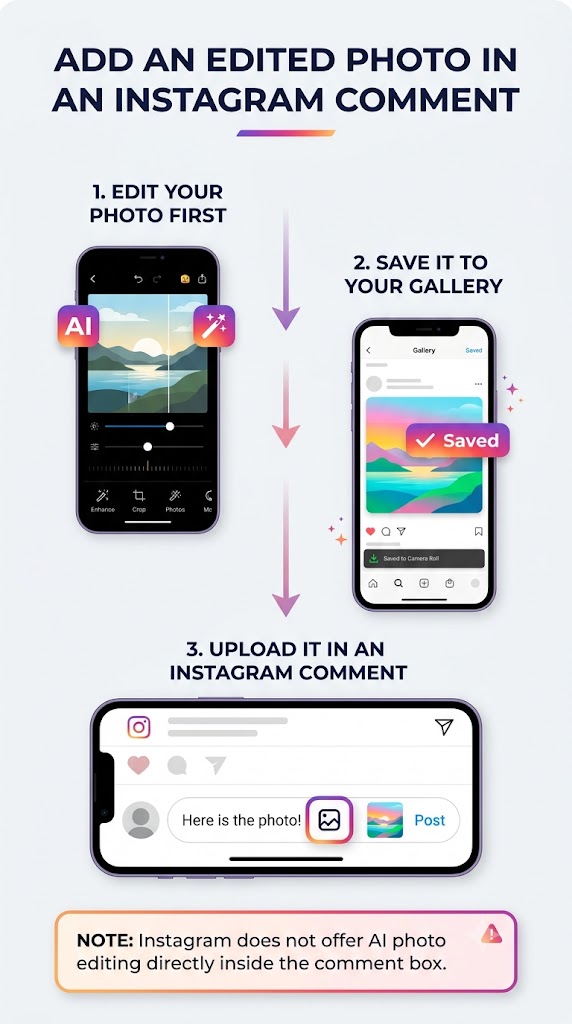
To share an edited photo in a comment, edit it first using a photo editor or AI tool, save it to your phone gallery, and then upload it through the photo icon in the comment section. Once you post a photo comment, you cannot replace or edit the image.
People mostly use them for memes, screenshots, reaction images, product photos, and quick visual answers. A few that work well:
If you run an account, expect more moderation work. Image comments can carry spam, scam links inside screenshots, or content that breaks the rules, and text filters may not catch it. It helps to ask for something specific, such as “show us your setup,” so replies stay on topic. And if the real goal is more conversation overall, this guide on how to increase Instagram reach covers what moves the needle across formats.
You have a few workarounds that do the same job:
None of these puts the picture in the public thread, but they get your image to the right person today.
No. Current reports describe photo comments as static images only. When I tried uploading a short video, the gallery picker showed only photos. This suggests that video comments are not supported yet, but check your app for the latest options.
Current reports do not confirm support for adding multiple photos in one comment. The photo picker may allow only one image at a time. If you need to share two photos, post them as two separate photo comments.
No. Instagram hasn’t announced any special ranking boost for photo comments. They may help a thread feel more active, but treat that as a side effect, not a trick.
Yes. Delete the comment the same way you would delete any other comment, and the photo will disappear with it. The exact steps may vary by phone and app version, but you can usually swipe or press and hold the comment, then tap Delete.
Not by itself. A missing photo icon does not always mean there is a problem with your account. It may simply mean the feature has not reached your account yet or your Instagram app is outdated.
Yes, but only if you are allowed to see and comment on that post. Comments on a private account stay limited to people who can view the post.
Adding a photo to an Instagram comment is quick once the photo icon appears in your comment section. If it is missing, the feature may simply not be available on your account yet. To get it faster, update the app, check your photo permission, and give it a few days.
Until then, use a GIF or share the image through a DM. Keep your photo comments public-safe and avoid sharing personal details or photos of others without permission.