Physical Address
304 North Cardinal St.
Dorchester Center, MA 02124
Physical Address
304 North Cardinal St.
Dorchester Center, MA 02124

A reshare on Instagram means someone took your Reel, post, or Story and put it on their own Story.
However, your original content stays linked to your account, so people can tap on it and find you. If you are asking what does reshare mean on Instagram Reels, that is the short answer.
Below, I explain what the count shows, where to find it, and why you sometimes see nothing at all.
Instagram uses a few similar words, and people mix them up. Here is how I keep them apart:
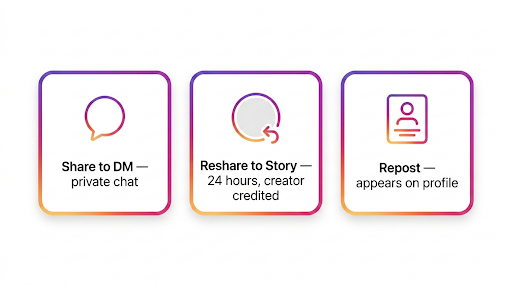
| Action | Where it appears | How long it stays |
|---|---|---|
| Share to DM | A private chat | Until the chat is deleted |
| Reshare to Story | The person’s Story, with credit to you | 24 hours |
| Repost | The person’s profile (where available) | Until they remove it |
Resharing a Reel to a Story has been available for a while, but Instagram keeps changing how the buttons and menus look. Here is the normal flow from the other person’s side:
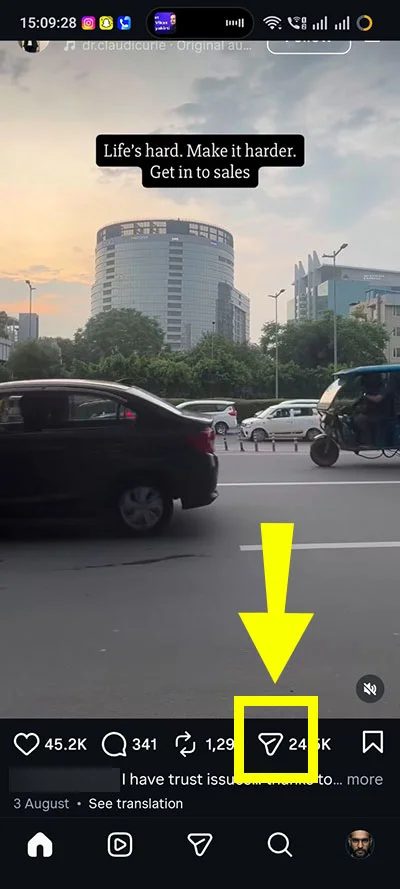
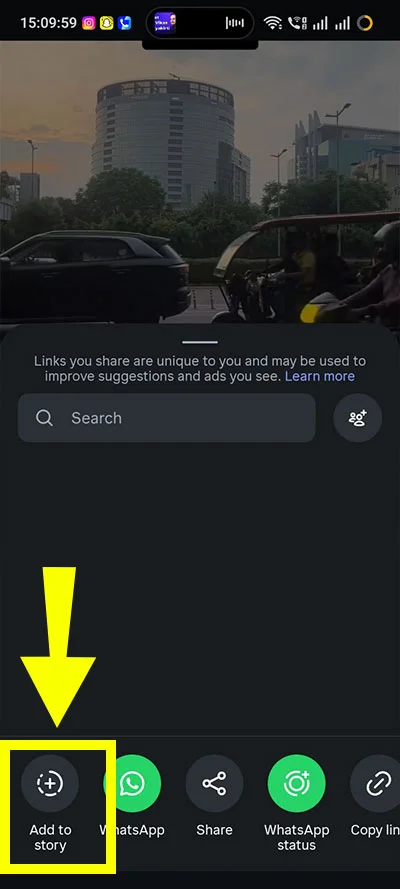
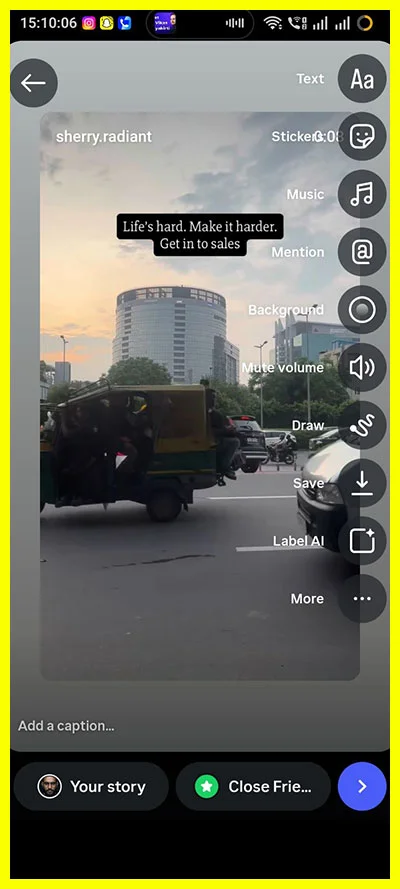
The Reel in their Story carries your username. Anyone who taps it goes to your original Reel. That is why reshares help you: your content reaches people who do not follow you.
Note: Menu names and button positions can change by app version, country, and account type. If a step looks different on your phone, update the app first.
The number you see can mean different things depending on where you look.
So if Insights says 40 shares and the reshare list shows 3 people, nothing is broken. Most of those shares were likely private DMs, and the others may have expired.
When someone reshares your Reel to their Story, you may see the reshare in their Story with your username attached, a higher share count in Insights, and sometimes a “View Story Reshares” option under the three-dot menu.
You will not always see every reshare, because private DM shares stay hidden and Story reshares disappear after 24 hours.

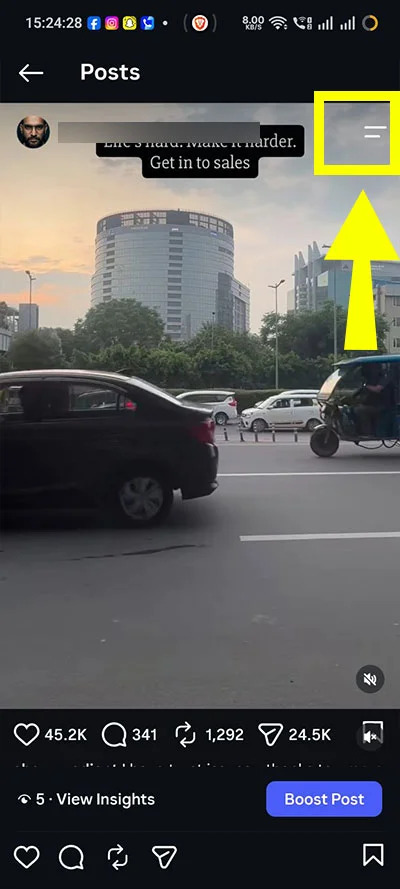
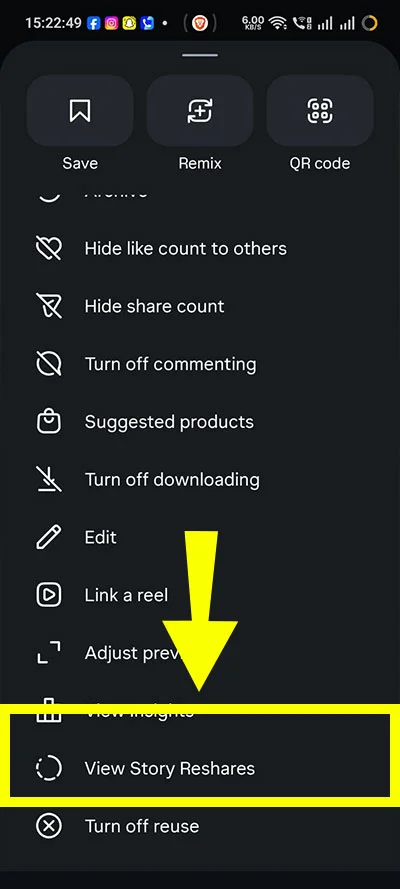
This shows who added your content to their Story in the last 24 hours. Once their Story expires, they drop off the list.
Note: If you do not see “View story reshares,” it usually means no public account has reshared your Reel to a live Story in the last 24 hours. You can still check the total share count in Insights.
To view your post or story insights, switch your Instagram account to a professional account (Creator or Business). It is free, and you can do it in Settings.

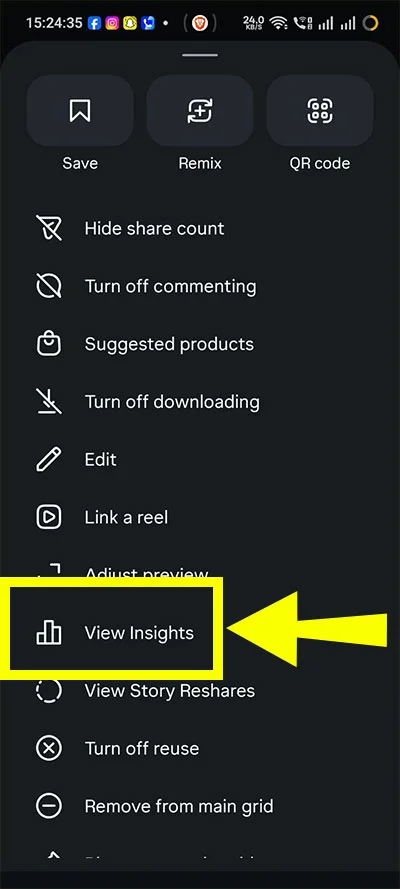
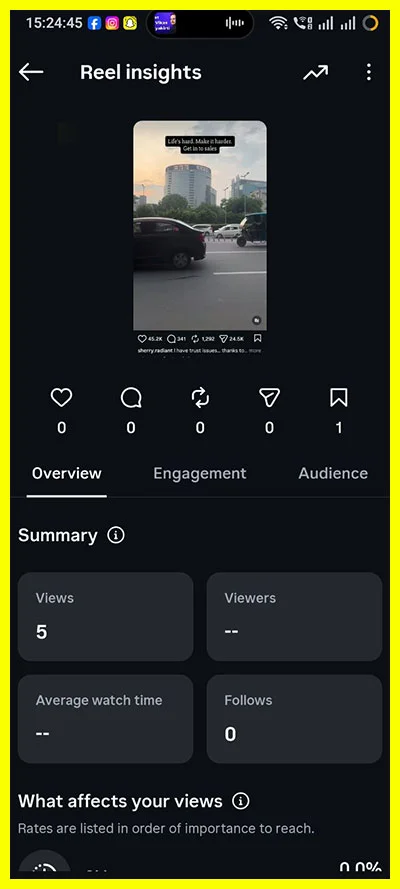
I use this one to compare Reels. If one Reel gets far more shares than the rest, I know that topic or style is worth repeating.
If someone reshares your Reel and tags or mentions you, you usually get a notification, and it shows in your DMs or activity. This is the easiest way to catch reshares in the moment. If they do not tag you, you may get no alert at all.
This is the most common complaint. These are the usual reasons:
If the option still does not show, log out and back in, or update the app. Both are quick and sometimes fix it.
Usually not in the normal flow. When you add someone’s content to your Story, Instagram keeps their username automatically on it. You cannot cleanly remove the credit. Some accounts also block reshares, so the Add to story button does not appear.
My advice is to leave the credit on. Removing it, or covering it with a sticker, is poor manners and can hurt your reputation with other creators. If you want to use someone’s Reel, ask them first.
Sharing also depends on the original account’s privacy and sharing settings.
If you want to reshare a public Reel to your own Story, follow these steps:
Instagram usually keeps the creator’s username attached automatically. If the option does not appear, check the creator’s privacy and sharing settings or update your app.
Whether someone can reshare your Reel depends mainly on your account and privacy settings.
To control Story sharing, open Instagram, go to your profile, tap the three-line menu, then go to Settings and privacy. Look under Story, Live and location or Story settings for the option that controls whether people can share your Stories or content. Instagram changes the exact menu path sometimes, so check your app if you do not see the same labels.
You cannot allow one person to reshare your Reel while blocking everyone else. Your options are basically to keep sharing on, turn it off, switch to a private account, or block specific accounts.
For your own Stories, the steps are a bit different:
Story data is only easy to read while the Story is live. After 24 hours, Instagram keeps the main numbers in Insights, but you lose the detailed view. If you run a business page, check your Story Insights each day instead of waiting a week.
Yes. While someone’s reshared Story is live, you can view it like any other Instagram Story. If it is your own Story, you may also be able to save it to your device or add it to a Highlight, depending on the options available in your app.
After the Story expires, the reshare disappears, but your original Reel remains on your profile.
Yes, in a real but limited way. A reshare puts your Reel in front of the resharer’s followers. Some of them will tap through and watch it. Instagram has also said shares are one of the signals it looks at, so a Reel that people send to friends tends to be a good sign. Still, no one outside Instagram knows exactly how much weight shares get, and anyone who claims a fixed number is guessing.
What I have noticed is that Reels people want to send to a friend perform better. Think of useful tips, relatable jokes, or something that makes you say “this is so you.” If you want more of that, read these practical ways to grow your Instagram reach. Shares are only one piece of it.
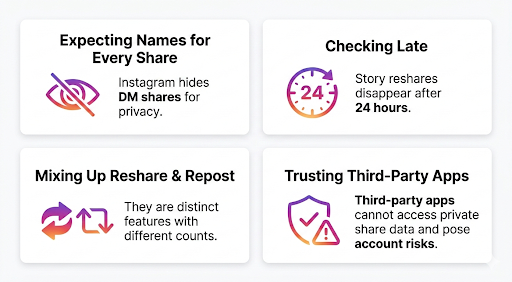
Because Instagram’s own help pages are short, and the feature changes often. On Reddit, creators compare notes on what they see in their app. The common complaints are the missing “View story reshares” button and share counts that do not match the list. The answers above cover the usual causes. For official details, the Instagram Help Center is the best place to confirm how a feature works for your region.
Sometimes. If you add someone’s Reel to your Story, Instagram may notify them or show the activity in their notifications, especially because the original creator’s username is attached. However, notification behaviour can vary by account type, privacy settings, and app version.
Yes. A reshare is a form of engagement because it shows that someone found your Reel useful, entertaining, or worth showing to their own followers. It can also lead to more views, profile visits, and follows, although Instagram does not disclose exactly how much weight it gives shares in its ranking system.
It means someone added your Reel, post, or Story into their own Story. Your username stays on it so people can find your original.
Sometimes. If the reshare is still live and the option appears for your account, you can see it. If the person mentioned you, you may also get a notification. Once the Story expires, you lose the list.
No. A reshare goes to someone’s Story and disappears after 24 hours. A repost is a separate feature that shows on a person’s profile, where it is available.
Yes. A Story reshare is included in the total shares number, which can also include private DM shares.
The share count includes private DM shares and old Story reshares. The reshare list only shows active ones.
Yes. Open your Instagram settings, find the sharing options under privacy, and turn off the setting that lets people add your content to their Stories. The exact path can differ by app version.
A reshare means someone added your Reel to their Story. Check live reshares from the three-dot menu and track the total share count in Insights. A high share count is a good sign, but it does not show every person who shared your content.
Note on sources: Instagram changes menus and features often, and it does not publish full details on how shares are counted. The steps above reflect how the app commonly works at the time of writing. Confirm on your own account, since rollouts differ by region and account type.