Physical Address
304 North Cardinal St.
Dorchester Center, MA 02124
Physical Address
304 North Cardinal St.
Dorchester Center, MA 02124


Instagram has made it absolutely easier for users who are accustomed to forgetting their account password while trying to log in with their profile. The “selfie verification” has advanced the security of your account and safeguards it with live face scanning. You might be confused about what we are talking about. Well, it’s a security and safety feature for users called Instagram selfie verification. The feature is to ensure you’re a real person on the platform and that the account belongs to you.
The feature is actually a simpler way for Instagram to say: “Show us you are a living person, and show us this is really your profile.”
Concerning my account safety, I have discovered this feature. So, I thought to share my personal experience with you. Here, I will provide the complete details about how the Instagram selfie works, why Instagram selfie verification failed, and everything you must know about this feature. This guide is full of security-specific tips for your account.
Let’s understand how selfie verification works on Instagram:
Similar to that, your location is also under surveillance.
Here’s why the Instagram selfie feature fails:
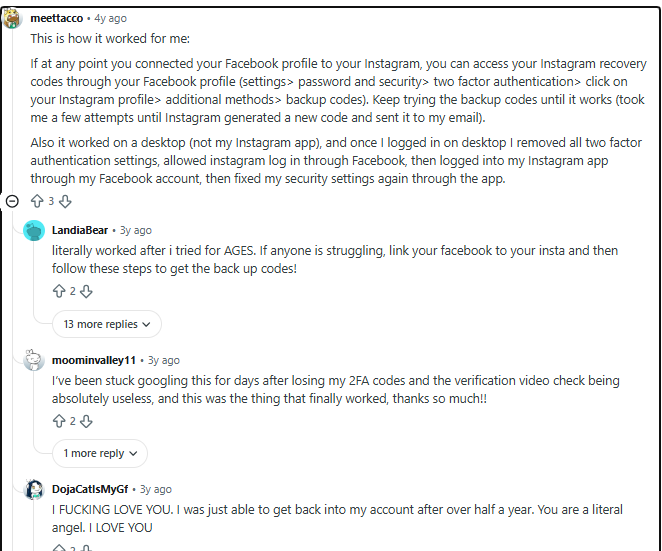
Here are users’ points of view from Reddit about Instagram selfie verification failure:
You can encounter these errors while doing selfie verification:
| Error Message | Meaning | Severity |
| “We couldn’t confirm it’s you” | Face match failed | Medium |
| “Try again later” | Cooldown triggered | Low |
| “Upload failed” | Network/app issue | Medium |
| Endless verification loop | System bug | High |
| “Verification stuck on uploading” | Upload timeout | Medium |
| “Identity verification failed” | Account mismatch | High |
Explore if you want to know about Instagram DM request is not showing.
If you have tried selfie verification multiple times and failed, wait for a while. If you keep trying it, the Instagram security algorithm may find it a suspicious attempt, which can worsen the situation. So, give it some time until you try the next time.
To ensure your video verification does not fail, you must use white bright lights while performing the process. Or, better, you can choose a bright place for verification. It will help show your face clearly, with no shadow at all.
Sometimes external factors may disrupt your device’s camera, such as dust, scratches and an object covering it entirely. So, you need to clean your camera lens by wiping the dust and removing the object. This helps capturing your picture well.
If you’re using a VPN or other private DNS while using Instagram, disable them. Instagram selfie verification may trigger with an outsourced network. So, focus on turning them off on your device.
If you are on mobile data, try to switch to Wi-Fi to make sure you regain Instagram features without an interruption. Changing networks sometimes helps because one network may be disturbing you a bit. That’s a completely security algorithm triggering for a particular network when it finds something is wrong with that.
You can choose to update the Instagram app. You might be facing an Instagram selfie error because your Instagram is outdated. Doing it is so easy. You can visit the App Store or Google Play Store and then update the app from there.
Your device caches may also be holding you back. They may interfere with your app’s functioning. As a result, you cannot complete the verification of your account.
You can clear up caches on your device like this:
Oh, so you have not allowed Instagram to access your device’s camera or other permissions. It’s necessary for video verification that your device’s camera is on. Simply tap Allow when the notification comes on your screen.
Your device plays an important role here. It should be the same one you have been using for a long time to use your Instagram account. When you try a new device while verifying your identity, it may be flagged as suspicious.
While you’re in front of the camera for selfie verification, make sure your face is absolutely visible and clear in the video. You should be in a normal state during the process. Anything like hats, masks, hair covering the face or reflection from glasses should be avoided.
You should avoid logging in to your Instagram account on multiple accounts. As this is one of the reasons why you might fail in the verification process, keeping logged in on one device is good from a safety point of view as well.
You can do one more thing: restart your device before attempting a second time. That’s when you have failed for the first time. This will refresh your device and may probably help your device come to a normal state.
One obstacle is real, and you cannot fix that on your own: an Instagram server outage. This is a widespread service disruption, so if that happens, you cannot get your service back; instead, wait for things to be better. Instagram will help find it and fix it.
All you can do is: check the current Instagram status on Downdetector and X/Twitter outage reports.
You can also seek out help from the official body. Instagram offers its users multiple options to report their problem and expect solutions. For example, you can:
As mentioned, be absolutely normal while verifying your identity through Instagram selfie mode. That is because the face embedding is everything they use to recognize you as a legit profile owner. The officials will try to match your current video with the existing photos on your profile. Ultimately, they will let you access your profile only if the picture is identical.
We have understood the steps to follow to fix the selfie verification, but have you ever thought about other ways to recover your account?
Yes, you can recover your Instagram account from different options other than selfie verification mode. All you need is to know about those options. The sections below will help you with that.
Email recovery: While you are on the login screen, tap ‘Forgot Password?’ or ‘Get Help’, enter your username or email address, or phone number. Then, select an email address to receive the account recovery code. Open the email and tap the one-time login link. Enter the password and complete the process.
Backup codes: You can also use the backup codes that you get after selecting the ‘Try another way’ option on your Instagram login page. Then you receive this code and try to figure out what to do next.
Trusted devices: Use the same device you used to log in to Instagram. The same device makes it easy and increases the chances of your account recovery in difficult times.
Meta support: So, you have multiple ways to get support; you can use official hacked account option or can try out other methods like live chat by subscribing to meta verified profile. After verification, you can visit:
Because your internet is slow, Instagram is down, device caches are holding you back, and face mismatched. That’s why you’re unable to verify your selfie on Instagram.
Your identity verification on Instagram keeps failing because the platform is not able to confirm your identity. Your face is mismatched with other photos on your profile. That happens when you cover your face with sunglasses, cap and not being stable during verification.
To fix it, find help from Instagram. Choose the ‘report a problem’ feature within your account. You can also select ‘instagram hacked account’ to report your issue. Also, you can fix your internet, update the app, clear the cache, and check server status.
That is because Instagram wants to confirm your identity on the app or that you are the real user. This helps you being secured in tough times.
There is no limit as such. But keep the gap between the attempts so it is not considered a suspicious attempt.
Instagram selfie verification is a safety feature to keep your account secured by confirming your identity with video recording. The feature ensures advanced safety by confirming the actual owner is using the account. In scenarios like account hacked, you can utilize this feature and recover your account easily. This does not require any email, password or other credentials; just your face is the real key to enter your account.