Physical Address
304 North Cardinal St.
Dorchester Center, MA 02124
Physical Address
304 North Cardinal St.
Dorchester Center, MA 02124

When you’re scrolling Instagram, a Reel may make you laugh or teach you something useful, but you move on without liking or saving it. Later, when you want to show it to someone, you realize it is no longer in your feed and you can’t find it anywhere.
But here’s the part most people don’t know: it isn’t gone. You can watch it again. Instagram now keeps a Watch History for Reels. This feature was added in October 2025, and it’s the quickest way to find that Reel again.
However, Watch History only covers recent viewing. This guide also explains what to do if the Reel you want is older than 30 days.
Instagram head Adam Mosseri announced Watch History in October 2025. It was built for exactly this problem: you watch a Reel, get interrupted, close the app, and can’t find it again.
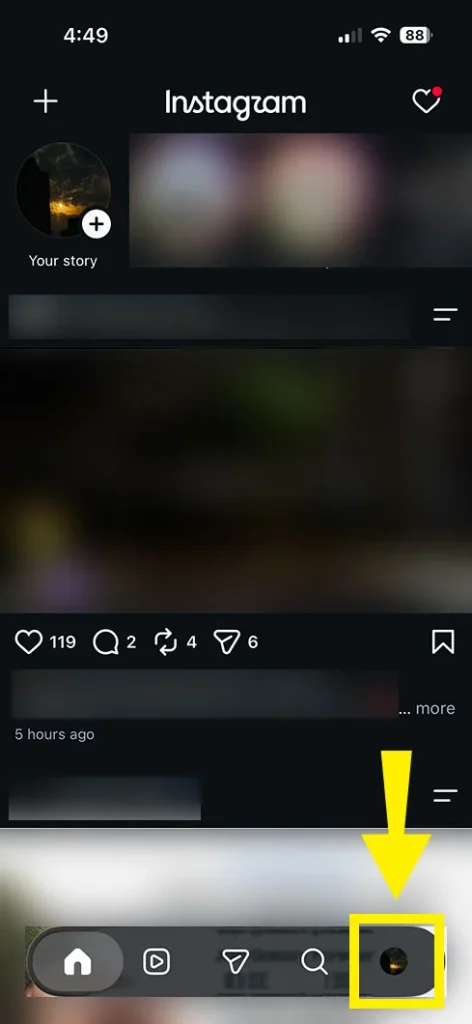
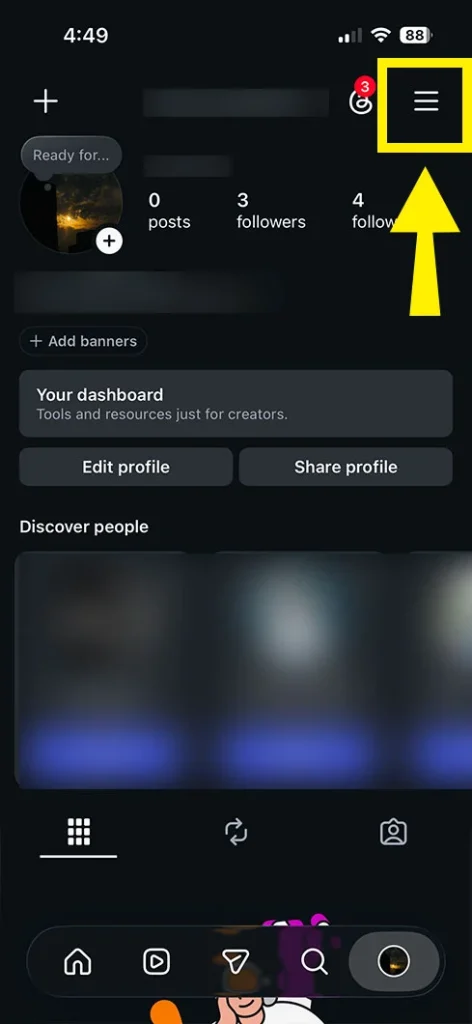
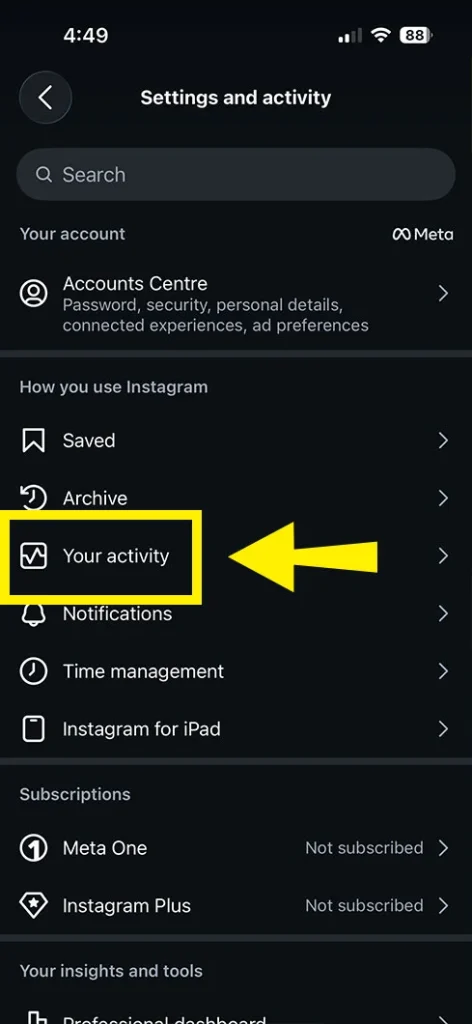
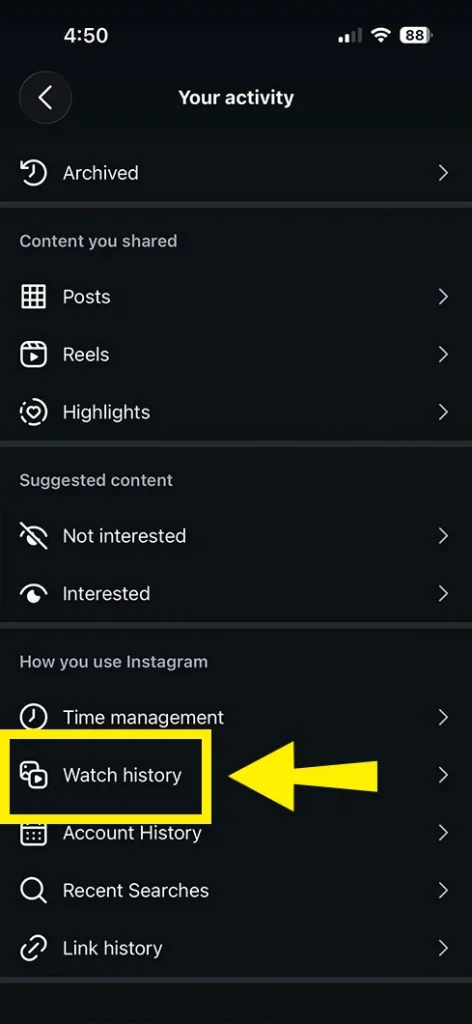
You’ll see a grid of Reels you’ve watched previously. Tap any Reel to watch it again or share it with someone.
Important: Watch History only goes back 30 days. Reels you watched earlier won’t appear here. (Mosseri’s announcement made it sound like “every Reel you’ve ever watched,” but the screenshots and several reviewers confirm the 30-day limit.)
A month of scrolling can be thousands of Reels, so use the filters at the top of the screen:
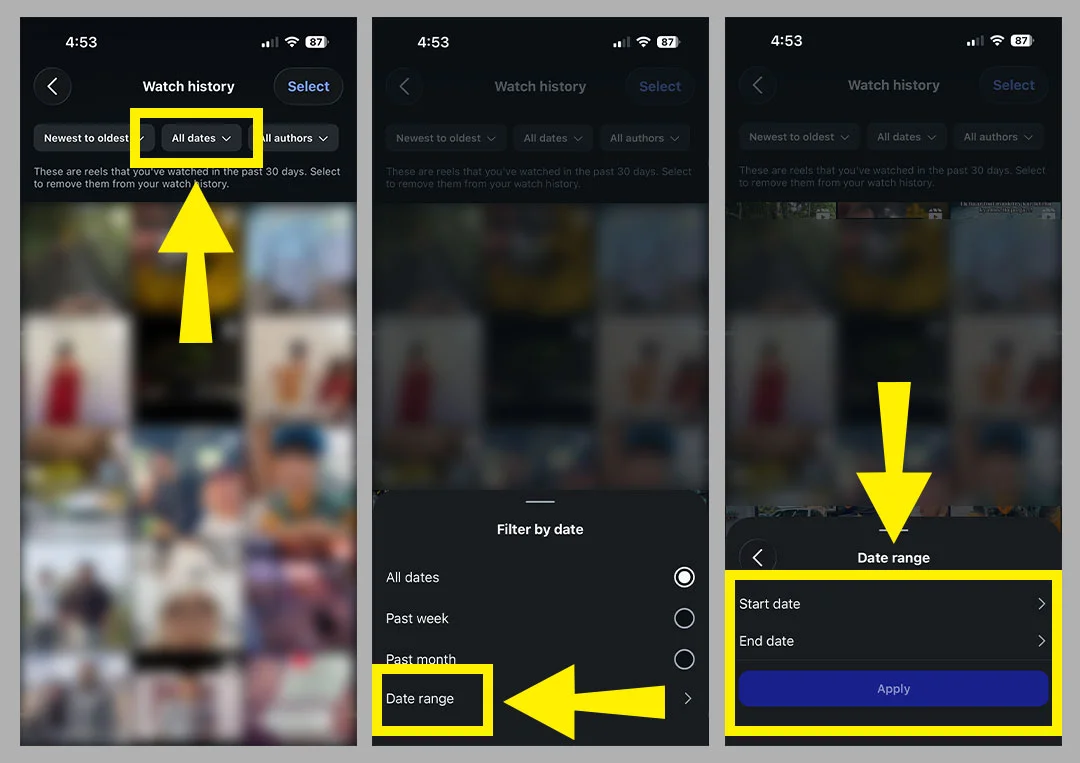
Tip: if you don’t know the creator, start with a narrow date range around when you think you saw it. It’s much quicker than scrolling the whole list.
A few things can cause this:
If you searched before and found articles saying Instagram doesn’t track what you watch, those pages are out of date. Before October 2025, that was true: people had to rely on likes, saves, or downloading their account data. Some websites never updated their old advice. The feature now exists, so follow the steps above and use it.
If it has been more than 30 days, Watch History will no longer show the Reel. Try these methods in order.
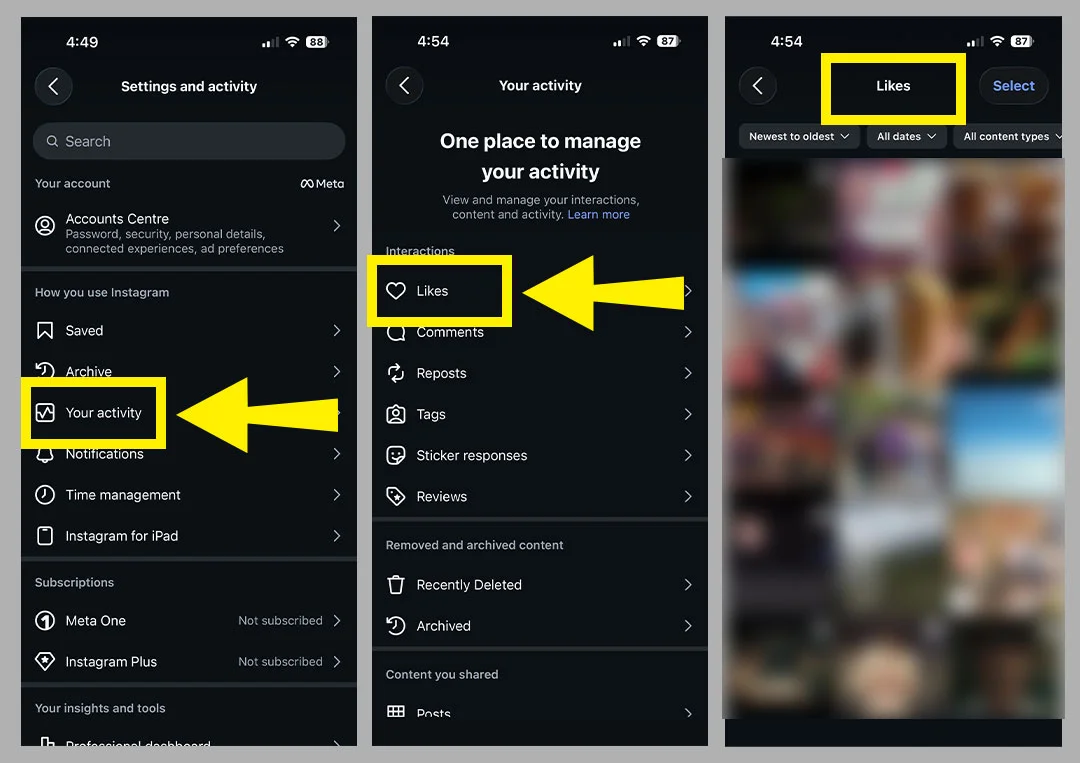
Even if you liked a Reel only briefly, Instagram keeps a record of it. Go to Your activity > Interactions > Likes. You can sort and filter by date and by creator, and this list goes back much further than Watch History. If you remember that you hit the heart, this is often the quickest backup.
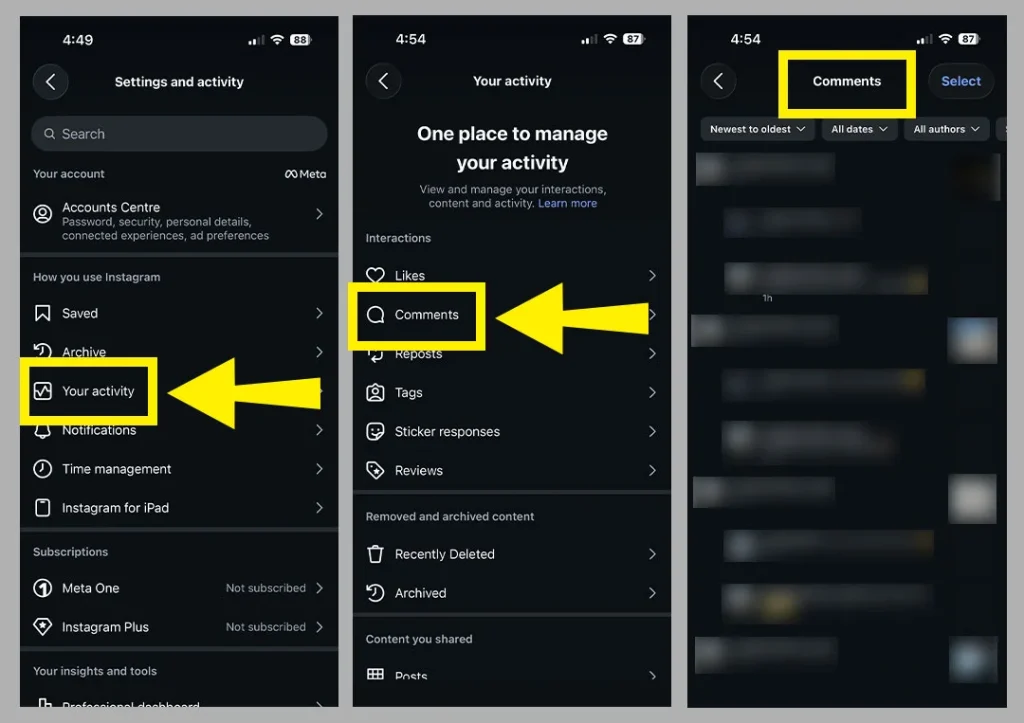
Did you comment on the Reel or send it to a friend? Look in Your activity > Interactions > Comments. Also open your chats: if you sent the Reel to someone, it’s still sitting in that conversation. If someone sent it to you, search your messages for that person’s name and scroll back.
It sounds simple, but if the Reel came up because a friend tagged you or DM’d it, they probably still have it.
If you remember who made it, open their profile and check the Reels tab. If you only remember a little (a username that started with a certain letter, or a face), try searching for the name. Instagram’s search remembers some recent searches too, but if yours isn’t showing up, our guide on what to do when Instagram search isn’t showing recent searches can help.
If you remember the song or sound, search for it. Tapping a sound on any Reel shows every Reel that uses it, and your lost one may be on that page.
Searching by song name inside Instagram, or typing a few words from the caption or on-screen text, can also surface it.
If you remember a hashtag from the Reel’s caption or on-screen text, search for it in Instagram. For example, search for #easyrecipes, #workoutmotivation, or #funnyreels.
Open the hashtag page and check the Reels tab. If the Reel is still public and uses that hashtag, it may appear there. This works best when the hashtag is specific, such as #veganpasta, rather than very broad, such as #food.
Instagram lets you request a copy of your account information. One guide (Outfame) says the file contains a record of videos watched at ads_information > ads_and_topics > videos_watched.html. Before Watch History existed, people used this method to dig up old Reels. I couldn’t confirm how far back the file goes, and Beebom notes that the standard data request doesn’t give you a proper watch history. Treat this as a long shot, and expect a long list with little detail.
If you remember something specific, such as a recipe name or a joke, try Google with the words you remember plus “Instagram Reel.” It won’t always work, but it costs nothing.
You’ll see third-party tools promising to show your full Reels history. We recommend avoiding them.
Instagram doesn’t give outside apps this information, and these tools often ask for your login. One marketing consultant reported a client losing access to a business account for 36 hours after connecting such a tool. You don’t need them now that Watch History exists, and you should never share your Instagram password.
If you watched a Reel you do not want in your history, or want to improve your recommendations, you can remove it.
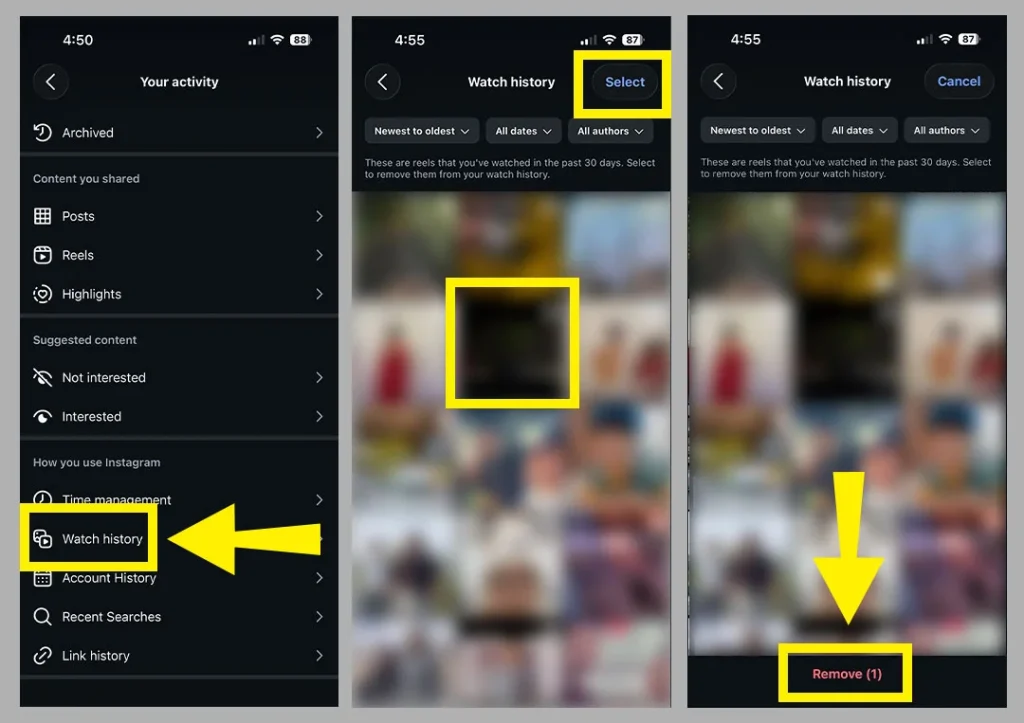
At the time of writing, there’s no one-tap option to clear everything, so removal happens in batches. Instagram uses your viewing activity to decide what to show next, so removing Reels can also help tidy up your recommendations.
If your feed keeps showing older content after you remove Reels, our guide on why Instagram feed shows old posts explains other possible reasons.
Watch History covers the last 30 days. For older ones, check your Likes, Comments, chats, and the creator’s profile.
It’s designed to list Reels you’ve watched, and some reviewers say videos and live broadcasts also appear. Instagram hasn’t published a full list of what counts, so if one is missing, check your Likes and Saved as well.
Creators can see total views and watch time through Insights, but Instagram doesn’t tell them who watched without engaging. Your Watch History is private to you.
You may not have watched Reels in the last 30 days, you may need to update the app, or the feature may not have reached your account yet.
I couldn’t find any official confirmation that Watch History is available on the Instagram website, so the safest place to look is the mobile app.
Last updated: October 2026. Instagram changes menus and features often, so the steps may look a little different on your phone.