Physical Address
304 North Cardinal St.
Dorchester Center, MA 02124
Physical Address
304 North Cardinal St.
Dorchester Center, MA 02124
On August 31, 2026, Instagram renamed its “AI creator” label to “AI-generated profile” and made one big change: profiles that feature an AI-generated person but don’t carry the label can lose reach and be removed from recommendations. Since then, creators have been reporting the same problems again and again: the label option is missing, the toggle won’t switch on, or a real person’s profile gets flagged as AI.
This guide is for creators and businesses who see AI-label errors, reach drops, or wrong AI flags on Instagram in 2026. It explains what the label actually is, who needs it, where the setting lives, and what to do for each common error. Where Instagram has not published an official answer, I say so clearly instead of guessing.
It is a profile-level disclosure. It tells viewers that the person featured in the account’s content was generated, or substantially created, with AI.
Instagram’s Help Center describes it as appearing on the profile page, in search results, and next to content in Feed, Reels, and Stories. These changes were made mainly for transparency, so viewers know when a profile features an AI-generated person.
Instagram’s reason is simple: people don’t like finding out later that a profile that looks human is actually an AI-generated person. The new wording focuses on who is shown, not which tools were used. That is a real difference from the old “AI creator” label, which could describe both a human using AI tools and a fully synthetic persona.
Do not mix this up with the “AI info” label.
AI info sits on a single post and says the content may have been made or edited with AI. The AI-generated profile label sits on the whole account.
They are separate systems, and they are also separate from the Meta AI chatbot feature. If it is the chatbot you are missing, see how to fix Meta AI not showing on Instagram.
| Your account | Label needed? |
|---|---|
| Virtual influencer with an AI-generated face/body | Yes |
| You on camera, captions or ideas written with AI | No |
| You on camera, photos retouched or upscaled with AI | No |
| AI-made graphics or covers, no person shown | No |
| Faceless account with text, B-roll, voiceover | No |
Instagram has not given clear rules for some special cases, like using a digital version of your own face or a brand using one AI model as its “face”. In these cases, the rule says if the person is made with AI, you should use the label. Instagram also says adding the label will not reduce your reach. So if you are not sure, it is safer to turn the label on.
Based on Instagram’s announcement and creator guides published after it, the setting is in the profile editor:
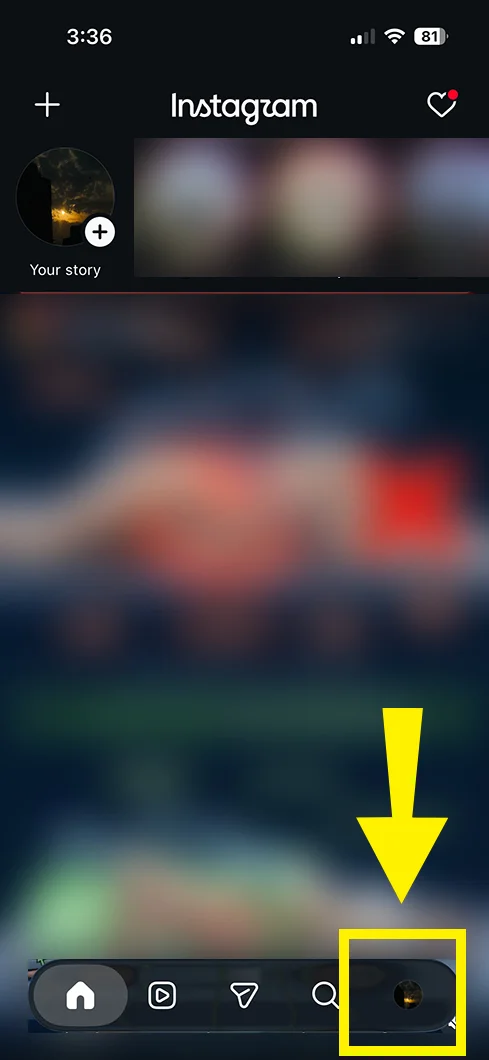
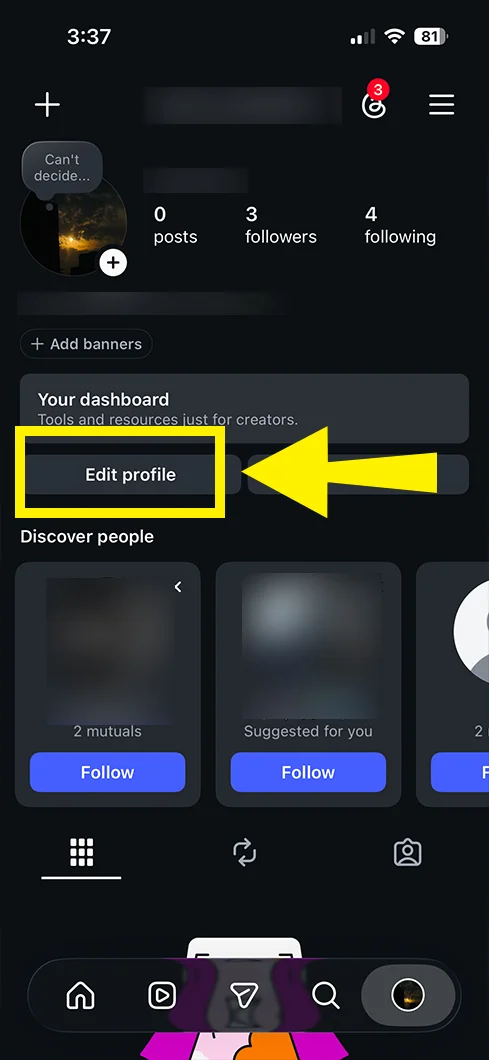
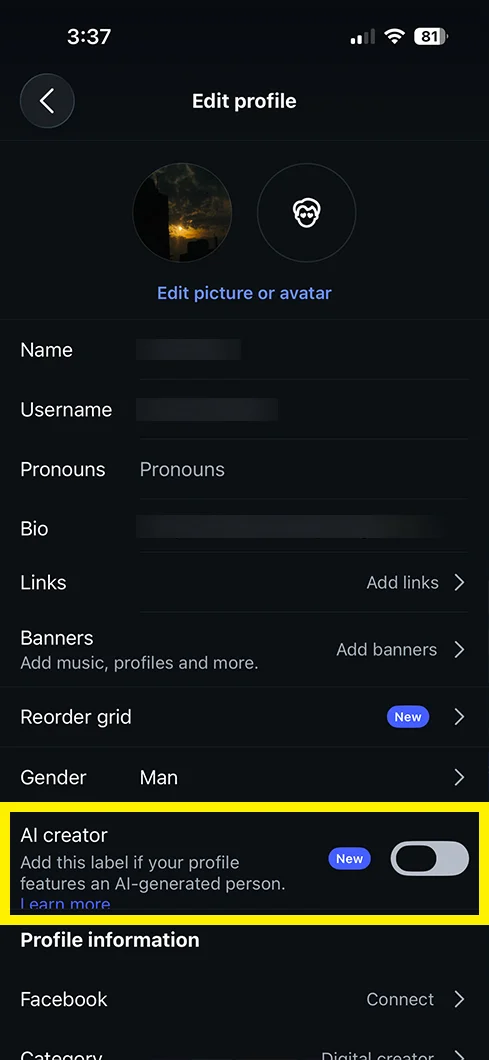
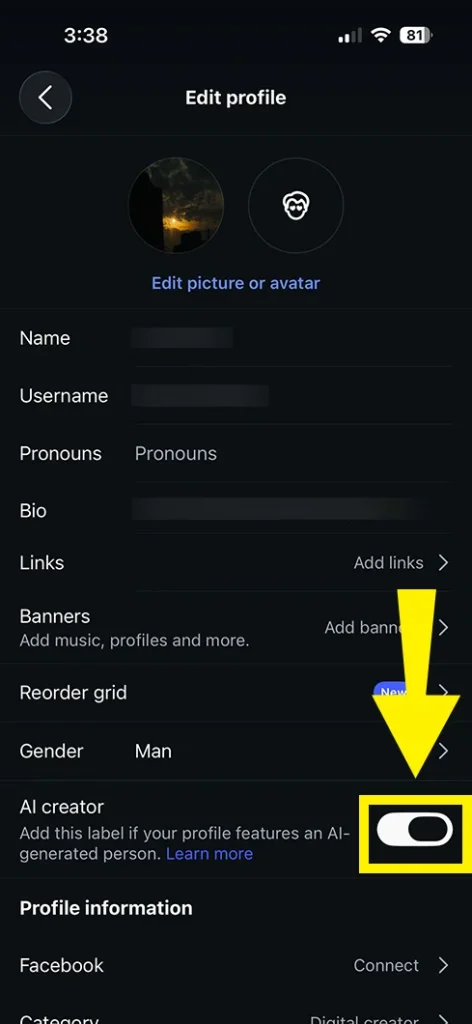
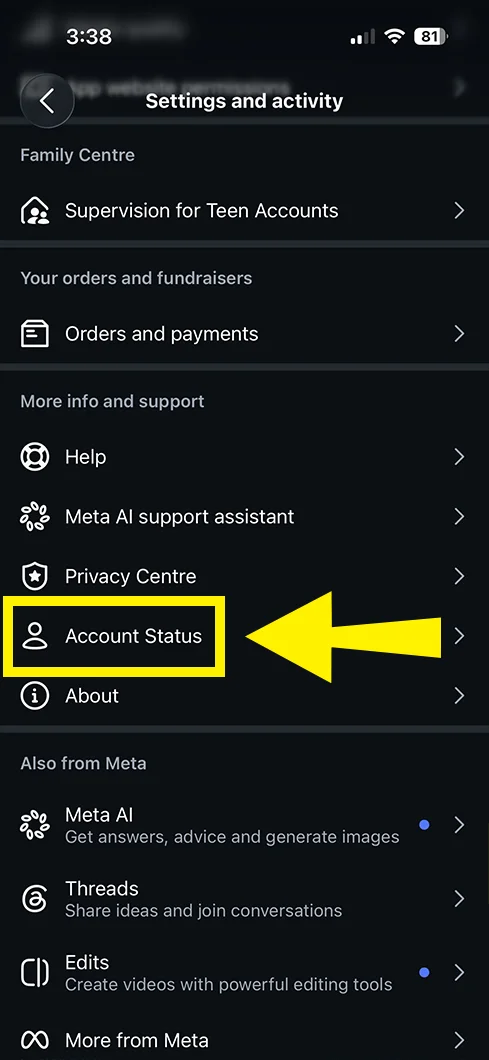
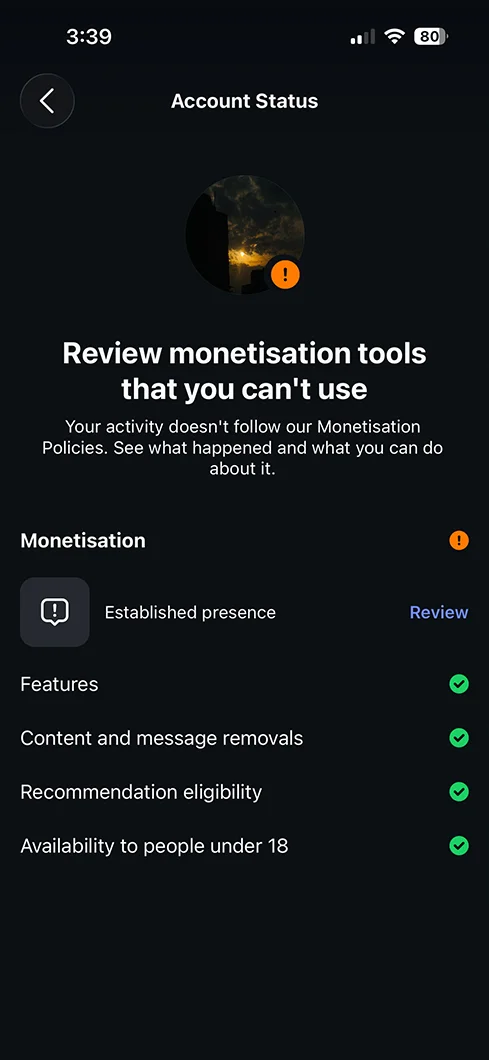
Note: Menu names change between app versions. If you can’t spot an option, use the search bar inside Settings and look for “Account Status”.
If you already used the old AI creator label, Instagram says it will show you the new name and a review step. You can confirm the label still fits, or remove it if you only use AI as a tool.
You open Edit profile and there is no AI option. Here is what is likely going on.
If nothing works: go to Settings → Help → Report a problem and describe exactly what you see, with a screenshot of the Edit profile screen.
You can see the toggle but can’t switch it on or off. Instagram has not published an official explanation for this, so here are the practical causes creators run into, based on how Instagram generally behaves:
Switching between Personal, Creator, and Business accounts is sometimes suggested in forums, but there is no official confirmation that account type controls this toggle. Only try it if you are comfortable with the side effects, since it can change your insights and tools.
If you see a “not available” style message, first ask the honest question: do you actually need the label? If you are a real person who uses AI for editing or captions, Instagram says you do not need it, so not having it is perfectly fine.
If you do run an AI persona and still can’t access it:
Instagram says it will detect unlabeled AI-generated profiles and notify the owner. Like any automated detection, it can get things wrong, especially with heavily edited photos, stylized avatars, or filters.
Per reporting on Instagram’s announcement, if an appeal is successful, the profile and its content become eligible for recommendations again. Instagram has not published how long a review takes, so avoid sending the same appeal repeatedly.
“Non-recommendable” means Instagram will not suggest your account or content to people who don’t already follow you. This covers surfaces like Reels, Explore, and suggested content. Your existing followers still see your posts.
If you’re not seeing any warning, it does not always mean everything is fine, but a clean Account Status makes the AI label an unlikely cause. If your overall numbers are down for other reasons, this guide on how to increase Instagram reach covers the usual culprits.
This pattern is very common, and it fits how the rule works: Instagram’s penalty targets recommendation surfaces. Reels and Explore depend heavily on recommendations, while your feed posts mostly reach followers. So an account that loses recommendation eligibility often sees Reels and Explore reach fall while feed engagement from followers looks normal.
Important: a Reels drop does not always mean an AI-label problem. Reach can fall from content, timing, or algorithm changes, so rule out the Account Status check first.
Here’s how the AI label can affect your reach, based on Instagram’s own statements and how the rule is being applied.
If you are specifically dealing with limited reach on an AI account, see the section below on how the AI label can affect reach and what to do.
Reach out when:
Go to Settings → Help → Report a problem. Use a clear description such as “AI-generated profile label issue: real person flagged as AI”, and attach screenshots of Edit profile and Account Status.
Most often it is an outdated app, a gradual rollout, or a temporary glitch. Update Instagram, log out and in, and check Edit profile again. Instagram has not published region or account-type exclusions.
No. Instagram says creators who use AI as part of their creative process (editing, captions, graphics) do not need the profile label. It is meant for profiles featuring an AI-generated person.
According to Instagram, no. Creators who add the label proactively will not see a change to their reach. The limits are aimed at AI-person profiles that skip it.
Turn off the toggle if it is on, then appeal through Account Status. If there is no appeal option, report the problem from Settings → Help with screenshots.
Instagram has not shared an official timeframe. After a successful appeal, your profile becomes eligible for recommendations again, but actual reach also depends on your content, so watch your non-follower reach over a week or two.
AI info is a label on one post. AI-generated profile is a label on the entire account and describes the person featured on it.
No. Meta AI is a separate chatbot feature. If you only want to hide that, follow this guide on how to turn off Meta AI on Instagram.
The profile label only tells viewers the person is AI-generated. It does not replace paid-partnership disclosure on sponsored posts, which is a separate requirement. Check the rules for your country or ask a qualified professional if you are unsure.
This guide is based on Instagram’s August 31, 2026 announcement and follow-up reporting. Instagram changes menus and policies often, so confirm what you see in your own app.