Physical Address
304 North Cardinal St.
Dorchester Center, MA 02124
Physical Address
304 North Cardinal St.
Dorchester Center, MA 02124

You tap on an Instagram post and see “24 comments” — but only three comments are actually visible. So, where did the rest go?
Before you assume that Instagram is broken or something is wrong with your account, take a breath. This is one of the most common Instagram issues, and in most cases, it is not permanent.
Usually, the problem is caused by a comment filter, a post setting, a small app glitch, or a temporary limit on your account. Sometimes, Instagram also hides certain comments automatically to reduce spam or offensive content.
The good news? You can usually fix it in just a few minutes.
A setting or filter could be hiding them. Instagram has several tools that limit comment visibility, so check these alongside possible loading problems.
Here is a quick map of the common causes.
| Cause | What you will notice | Where to look |
| Hidden Words or comment filters | The count is higher than what you can see | Hidden words in settings, then View hidden comments |
| Restrict | One person says they commented, but nobody else sees it | Tap See comment on that person’s comment |
| Limits | Comments from new followers or non-followers are missing | Limits in settings |
| Commenting turned off | The whole comment section is empty or unavailable | The three-dot menu on the post |
| Blocked account | The account’s profile and posts are out of reach | Nothing to fix on your side |
| App glitch or old cache | Comments spin, load half way, or look fine on another device | Update, restart, clear cache |
|
Temporary commenting limit or spam filter |
Your own comment fails or only you can see it |
Pause commenting; avoid repeated or link-heavy comments |
Open the same post in a browser or on another device while signed in to the same account. Then compare what you can see:
If the post belongs to someone else, only the owner can change its comment settings and filters. You can troubleshoot your own app and connection, but you cannot override their settings.
The count can include comments you cannot see right now. Some are hidden or filtered. Others simply have not loaded yet.
Say a post shows 24 comments, but only three appear.
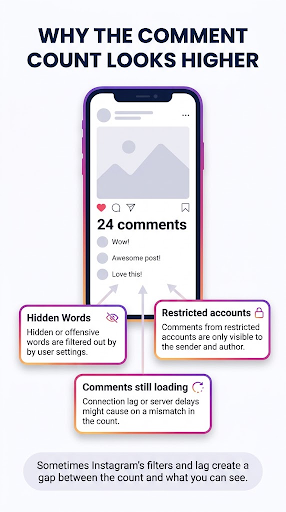
If it is your post, scroll to the very end of the comments and tap View hidden comments. Filtered comments often sit there, and Instagram’s Help Center describes this path for hiding and unhiding comments on your own posts.
If it is not your post, the owner may have hidden some comments. A slow connection can cause the same look, because the photo or video loads first and the comments arrive later. Pull down to refresh, or switch from Wi-Fi to mobile data and try again.
A note on accuracy: Instagram does not publish an exact rule for how it counts hidden comments. Treat the explanations above as the most likely ones, not a guarantee.
Yes. Hidden Words can hide comments containing offensive words, phrases or emojis. You can also create a custom list, so check whether a word you added could be filtering genuine comments.
Instagram’s Help Center page on hiding comments explains the available filters:
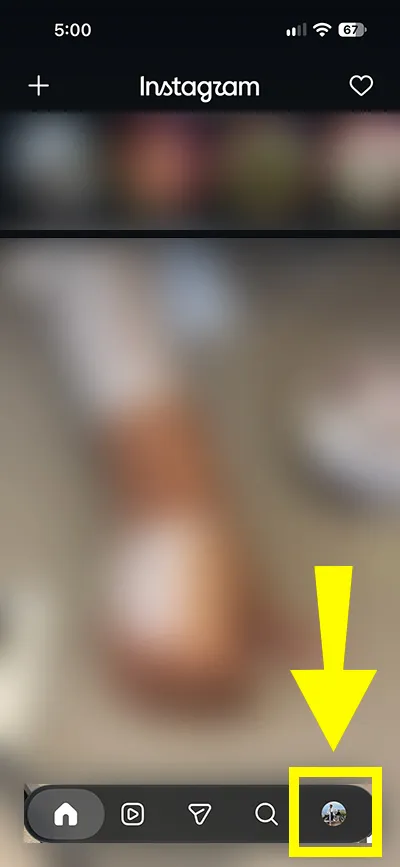
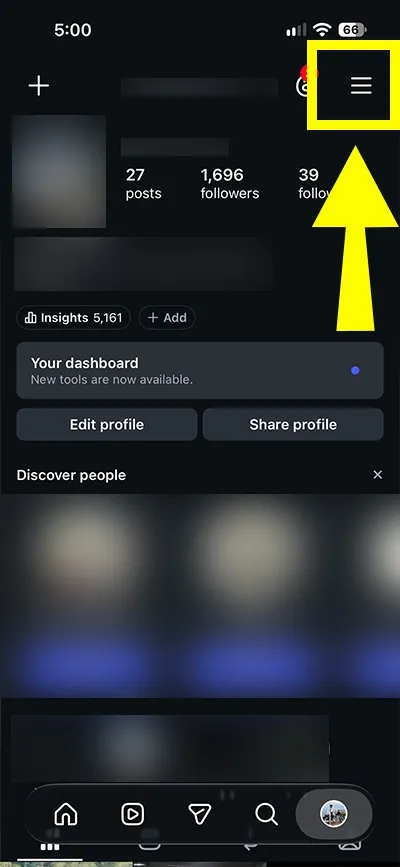
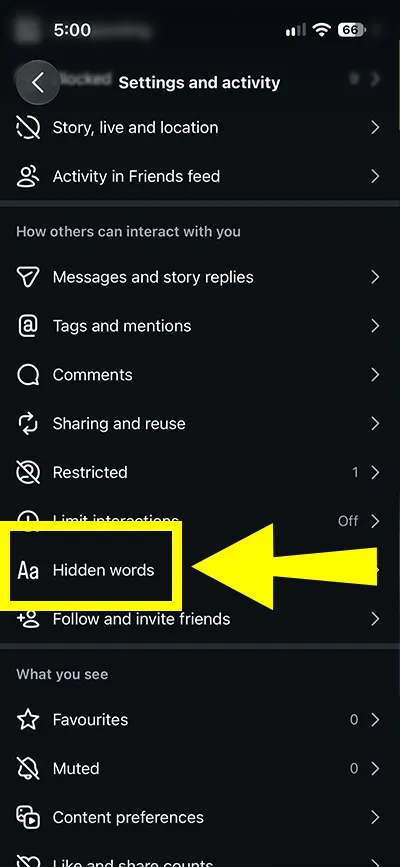
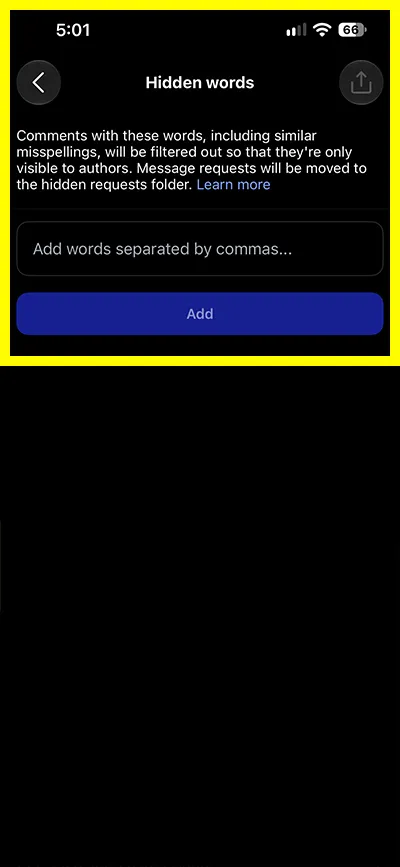
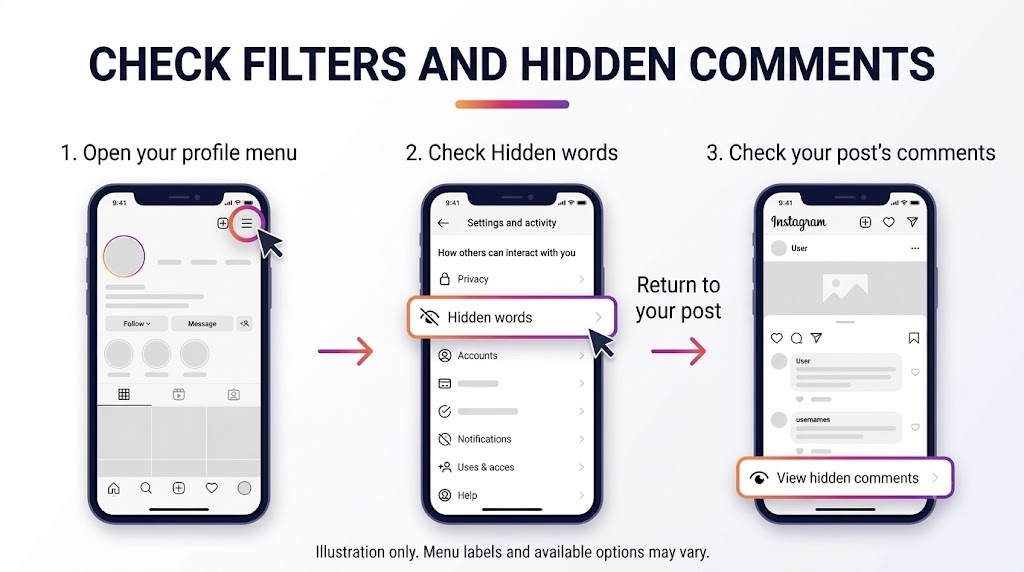
Menu names change a little between app versions, so use the search bar in settings if you cannot find it.
Custom lists are blunt. Imagine a shop that adds “free” to its list to stop scam comments. A genuine comment such as “free shipping, thank you!” could also get caught by that filter. Instagram also says the filter applies to new and existing comments. So adding one word can make old comments look like they vanished overnight.
You can hide a single comment on your own post by tapping Hide under it. Instagram says a manually hidden comment is only visible to you and the person who wrote it. If several people manage the account, ask around before you assume something is broken.
Any of these can hide comments. They work differently, which is why it helps to compare them side by side.
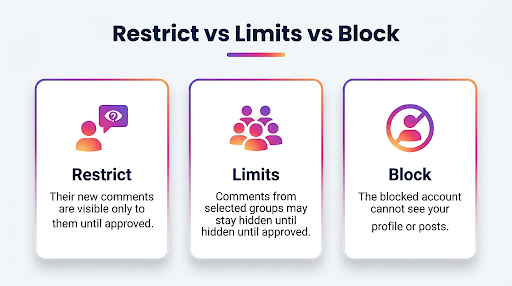
| Tool | Who it targets | What happens to their comments |
| Restrict | One chosen account | New comments are visible only to that person until the post owner approves them |
| Limits | A group, such as recent followers or accounts that do not follow you | Comments stay hidden unless the post owner approves them |
| Block | One chosen account | The blocked account cannot see the profile or posts |
| Turn off commenting | A single post | Nobody can comment, and existing comments are hidden |
According to Instagram’s Restrict help page, a restricted person’s new comments are visible only to them. As the owner, you can tap See comment, then choose Approve, Delete or Ignore. Instagram also notes that you will not get notifications for future comments from someone you restrict.
That last point matters. If you are waiting on an alert that never comes, a restricted account could be the reason.
Limits is meant for sudden waves of attention. Meta introduced it in 2021 to hide comments and message requests from people who do not follow you or who only just followed. You can read the original announcement from Meta for the reasoning. If you turned it on during a busy week and forgot, that could explain a quiet comment section.
If the owner has restricted you, your new comment can look normal to you without being visible to other viewers until the owner approves it. Checking from another account that can access the post may reveal a visibility difference, but it does not prove you were restricted. A comment filter could produce a similar result.
If the comment box is gone or the section looks empty, the owner may have turned commenting off for that post. When this happens, Instagram hides the comments that were already there. They come back if the owner turns commenting on again.
If it is your post, open it, tap the three dots, and choose Turn on commenting. Also check who is allowed to comment in your comment settings. An option such as “people you follow” limits commenting to accounts you follow. It can exclude potential customers even if they already follow your account. The exact menu path varies by app version.
If it is not your post, there is nothing to fix. If you cannot see comments on posts from one account only, this is one of the most likely reasons.
The usual causes are a weak connection, an old app version, or stored temporary files that have gone stale. Try these in order, because each one is quicker than the next.
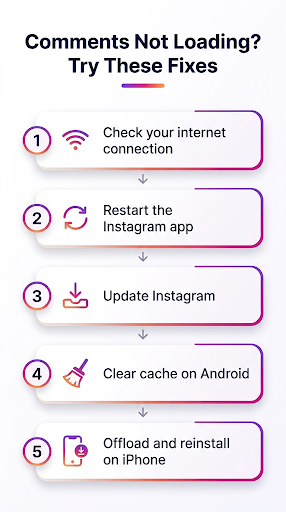
The cache is just stored data that helps the app load faster. When it goes stale, Instagram can keep showing old or incomplete content. It is the same kind of glitch behind a feed that keeps showing old posts, so the same steps often help both.
If comments stop appearing after an update, the timing alone does not identify the cause. Try these checks:
If only one post is affected, check its comment settings and hidden comments first. A problem affecting one post does not, by itself, identify the cause.
Instagram may be treating it as spam, or the post owner’s filters may have caught it. Check whether you have repeated the same text across multiple posts or included wording that the owner’s filters might catch.
Try this:
You may see this called a “comment shadowban.” That is community slang, not a setting name Instagram uses. Skip any service that promises to unblock your comments for a fee. The practical fix is to slow down and comment naturally.
If updating and restarting the app do not help, and no comment setting explains the problem, report it to Instagram. Include the affected post, screenshots, your device model, and app version.
In the app, open your profile, tap the menu, choose Help, then tap Report a problem. Add a screenshot of the post showing the count and what you can see. Mention your device and app version. A clear report is easier for support to act on.
A low comment count is different from missing comments. If there is no evidence that comments disappeared, review the post’s reach and engagement separately. These ways to get more Instagram reach offer a starting point.
No, Instagram does not currently offer a way to restore a deleted comment. Hidden comments are different — the post owner can unhide them.
No. Restricting is private, and the person is not notified. They just keep seeing their own comments as normal.
Only approved followers can see a private account’s posts. If you are not approved, the comments under them stay out of view too.
Instagram lets you turn Limits on temporarily and extend it if needed. Comments and message requests from the selected group stay hidden while Limits is active.
To review comments from limited accounts, open your post’s comments and look for Options > See Limited Comments. You can then manage or approve those comments. Menu labels may vary by app version.
Start with cache. Clearing data signs you out and removes saved app data, so keep that as a last step.